
Torturing 100 Mbit Ethernet through a slip ring, six connectors, and two coat hangers

We measured how much a spinning slip ring, two couplers, solder joints, two pairs of aviation connectors, and six feet of untwisted wire degrade an Ethernet link, using iperf UDP tests at the product's real data rate. Answer: almost nothing, to a degree that surprised us. Includes one botched first test round, one lesson about link negotiation, and a closing experiment involving wire coat hangers that we do not endorse but cannot stop being proud of.
Why
Our freestanding LED pole spins. The pole body rotates freely on bearings while 100 W of LED power and the pixel data stream both have to cross from the stationary base into the rotating tube, which means everything goes through a slip ring: rings and brushes, sliding electrical contact, at whatever RPM a dancer produces.
The data path through a finished pole is a signal integrity horror show on paper. In order, a packet crosses:
- a Cat5 cable that we gut to 2 twisted pairs (100BASE-TX needs only pairs 1-2 and 3-6, and conductor count is precious through the ring),
- the slip ring itself, possibly rotating,
- 2 barrel couplers,
- solder joints where the pairs meet the ring's pigtails,
- 2 sets of GX12 aviation connectors (chosen for mechanical strength: if someone drops a pole half, the connector should survive),
- a 6-foot molded 6-conductor cable whose conductors are not twisted at all.
Every one of those is a small impedance discontinuity, and the untwisted tail abandons the one thing that makes Ethernet work over cheap cable. We wanted numbers instead of vibes, so on 2022-05-20 we put iperf on two Windows laptops and asked four questions:
- What does each stage of that chain cost in bandwidth, jitter, and packet loss at the product's link rate?
- Does the slip ring get worse while it is actually rotating?
- How far above our real traffic is the ceiling where the link finally does degrade?
- (Added later that night, by the group chat.) What is the stupidest conductor that still carries 100BASE-TX?
The bench
Two Windows laptops and iperf 3.1.3 running 30-second UDP tests: iperf3 -c <host> -u -V -b 100m -t 30,
8192-byte blocks. UDP because that is what the product speaks (the pole
streams pixel frames as UDP packets), and because UDP exposes loss and
jitter instead of letting TCP retransmissions hide them. The 100 Mbit/s
target matches the product's link class; the actual pixel stream for a pole
is about 4 Mbit/s, so this tests at roughly 24x our real load.
Take 1: numbers we could not trust
The first round ran across the shop network (both machines on the 192.168.5.x LAN) and produced garbage alongside the signal. The best-case configuration, a normal 4-pair cable with nothing weird in line, lost 54% of datagrams at a 100 Mbit target:
[ 4] 0.00-30.01 sec 357 MBytes 99.7 Mbits/sec 0.115 ms 24868/45669 (54%)
while the same path had happily reported 326 Mbit/s at 1.2% loss twenty minutes earlier. Whatever was eating those datagrams lived somewhere in the shop network or the receiving machine, not in the cable.
That transcript line is also worth reading slowly, because it is easy to misread in exactly the direction that flatters your cable. The transfer and bandwidth columns of an iperf3 UDP client summary describe what the sender put on the wire, not what the far end received: 357 MBytes at 99.7 Mbit/s is all 45,669 datagrams, the 24,868 lost ones included. On a UDP client summary, "bandwidth" is an offered rate; the only column reporting delivery is the loss count sitting next to it.
One set of runs also went out with -b 100 instead of -b 100m, which
iperf reads as a target of 100 bits per second; it pattered along at
about 675 Kbit/s sending one datagram at a time. Round 1 taught us nothing
about wiring and everything about benches: a link test is only as good
as the two endpoints and everything between them.
Take 2: direct link
Round 2 removed the network: laptop to laptop, static IPs on 192.168.2.x, nothing else on the wire. Every configuration below is a fresh 30-second run from that clean bench.
The degradation chain, measured
| Configuration (cumulative) | Bandwidth | Jitter | Lost/Total |
|---|---|---|---|
| Cat5, 4 twisted pairs (negotiates 1000BASE-T) | 99.9 Mbit/s | 0.046 ms | 0/45,749 |
| Cat5, 4 pairs, repeat run | 99.8 Mbit/s | 0.002 ms | 0/45,680 |
| Cat5, 2 twisted pairs (negotiates 100BASE-TX) | 95.1 Mbit/s | 0.123 ms | 0/43,545 |
| + slip ring, stationary | 95.1 Mbit/s | 0.120 ms | 0/43,533 |
| + slip ring, stationary, repeat | 95.1 Mbit/s | 0.128 ms | 0/43,530 |
| + slip ring, rotated back and forth by hand | 95.1 Mbit/s | 0.124 ms | 0/43,542 |
| + 2 couplers | 95.0 Mbit/s | 0.121 ms | 0/43,510 |
| + 6 ft untwisted extension (molded 6-conductor) | 95.1 Mbit/s | 0.125 ms | 0/43,518 |
| + twisted-pair extension (control) | 95.1 Mbit/s | 0.129 ms | 0/43,524 |
Throughput remains about 95.1 Mbit/s and jitter about 0.12 ms through the two-pair cable, moving slip ring, couplers, untwisted extension, twisted control, and coat hangers.
Three things worth saying about this table.
The 99.9 to 95.1 step is not degradation, it is negotiation. With all 4 pairs connected the NICs negotiate gigabit, and Windows reports a 1 Gbps link (iperf at unlimited bandwidth confirmed it: 949 Mbit/s). Cut to 2 pairs and the link renegotiates to 100BASE-TX, where a 100 Mbit/s UDP target minus Ethernet, IP, and fragmentation overhead on 8 KB datagrams tops out right around 95.3 Mbit/s. Every 2-pair configuration sits exactly on that ceiling. The correct baseline for the torture chain is the 95.1 of the plain 2-pair cable, and against that baseline the whole chain cost zero bandwidth and zero lost datagrams.
Rotation did not matter. Working the slip ring back and forth by hand during the full 30-second run: 95.1 Mbit/s, 0.124 ms jitter, 0 lost out of 43,542. Identical to stationary within run-to-run noise. The brushes held contact well enough that nothing reached the datagram counter. That is one 30-second run, not a wear test.
The untwisted tail does not matter either, at this rate and length. Six feet of parallel conductors in a molded jacket measured the same as the twisted-pair control run to three significant figures. Twisting matters somewhere. We did not find where: all this says is that at six feet and 100BASE-TX the untwisted tail cost us nothing we could count, and a datagram counter cannot see what those parallel conductors radiate.
One thing we did not test. The same slip ring carries 100 W of LED power a few millimeters from these pairs, and the bench had none of it: no lamp load, no switching transients, no thermal soak, no production RPM. Everything above is a data-only measurement of a data-and-power assembly.
The uncapped runs, and why we do not get a ceiling out of them
At a 100 Mbit target everything measured clean, so the interesting
question became: how hard can you push before the chain shows its seams?
The only unlimited-bandwidth runs we have (-b 0) are from take 1, and
they will not answer it.
In the discarded first round, baseline runs offered 311-326 Mbit/s and came back with 1.1-1.3% loss, while slip-ring runs offered 344-367 Mbit/s with much more variable loss of 3.1-22%. The round was contaminated and the throughput figures are offered rates, so the difference is not attributable to the slip ring.
Read quickly, they look like a result. Baseline runs offered 311-326 Mbit/s and came back with 1.1-1.3% loss; through the slip ring the sender pushed 344-367 Mbit/s and loss went ragged, 22%, 3.1% and 7.6% across the three runs that kept per-run figures. That is a tidy story about a slip ring finally costing something, and it is not one we can tell.
Three reasons, any one of them fatal. These are take 1 runs, the round this post already throws out, with shop traffic and the receiving machine in the path; 54% loss on a perfect cable is what that contamination looks like, and nothing about it stopped for the slip-ring runs. Those throughput numbers are offered rates, per the client-summary reading above, so "367 Mbit/s" describes how hard the sender pushed and says nothing about what the medium carried. And the loss percentages are arithmetically impossible for a 100BASE-TX segment: offer 367 Mbit/s into a 100 Mbit link and roughly three quarters of it has nowhere to go, which is a loss figure near 73%, not 7.6%. Whatever take 1 had in line, it was not the two-pair link the rest of this post is about.
The bookkeeping does not survive either. Our own summary of that round in the shop manual lists four unlimited slip-ring runs spanning 323 to 367 Mbit/s, not the three above, and the fourth sits down inside the baseline's own range with no per-run loss number that outlived the transcript.
What is left is the honest residue: with the sender deliberately
overrunning the link, more than 3x our whole link class, loss went ragged
on a bench we do not trust, and which layer produced that variance was
never measured. Finding the real ceiling means running -b 0 on the take
2 bench, direct link, nothing else on the wire, which we have not done. At
the rate we actually ship, take 2 says nothing measurable happens at all,
and that is the number the product rides on.
The coat hangers
We posted the results to the group chat, which delivered genuine peer review (the link negotiation question from the table above) and then, immediately, an escalation:
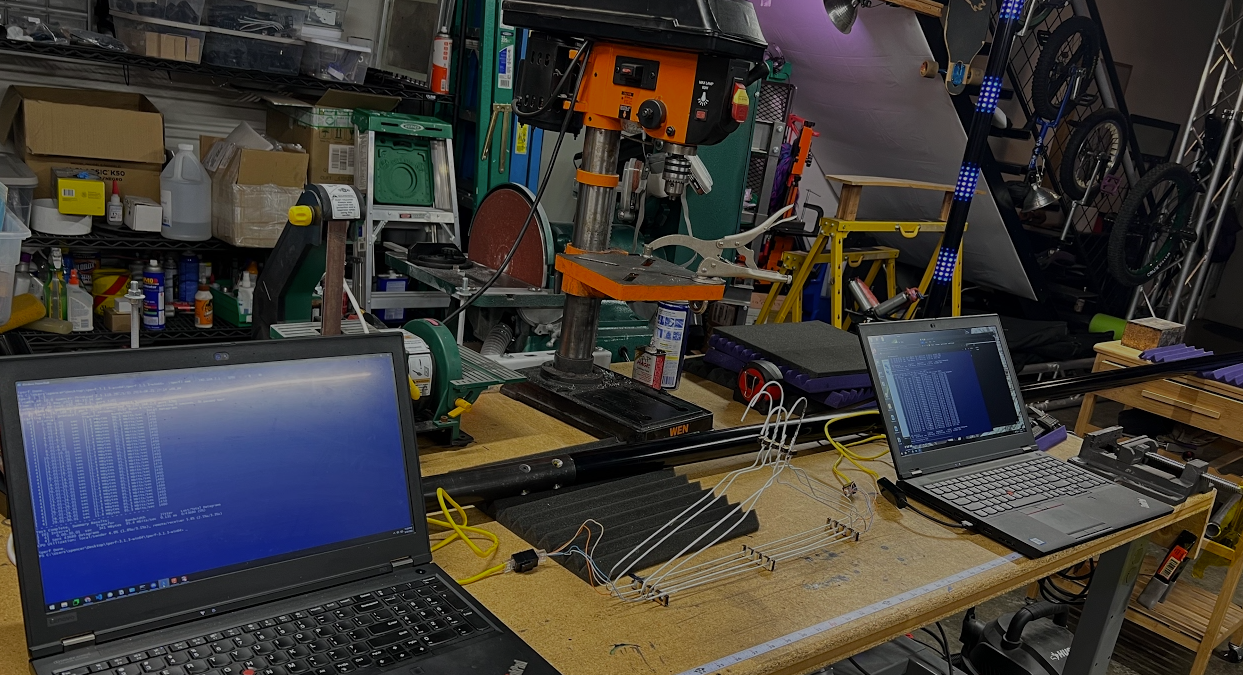
So, later that night: two pairs of wire coat hangers, untwisted (coat hangers resist twisting), RJ45 stubs at each end, laptops reconnected.
[ ID] Interval           Transfer     Bandwidth       Jitter    Lost/Total Datagrams
[  4]   0.00-30.01  sec   341 MBytes  95.4 Mbits/sec  0.137 ms  0/43680 (0%)
Full 100BASE-TX goodput. Zero loss. 0.137 ms of jitter against the cable's 0.123. The reaction:
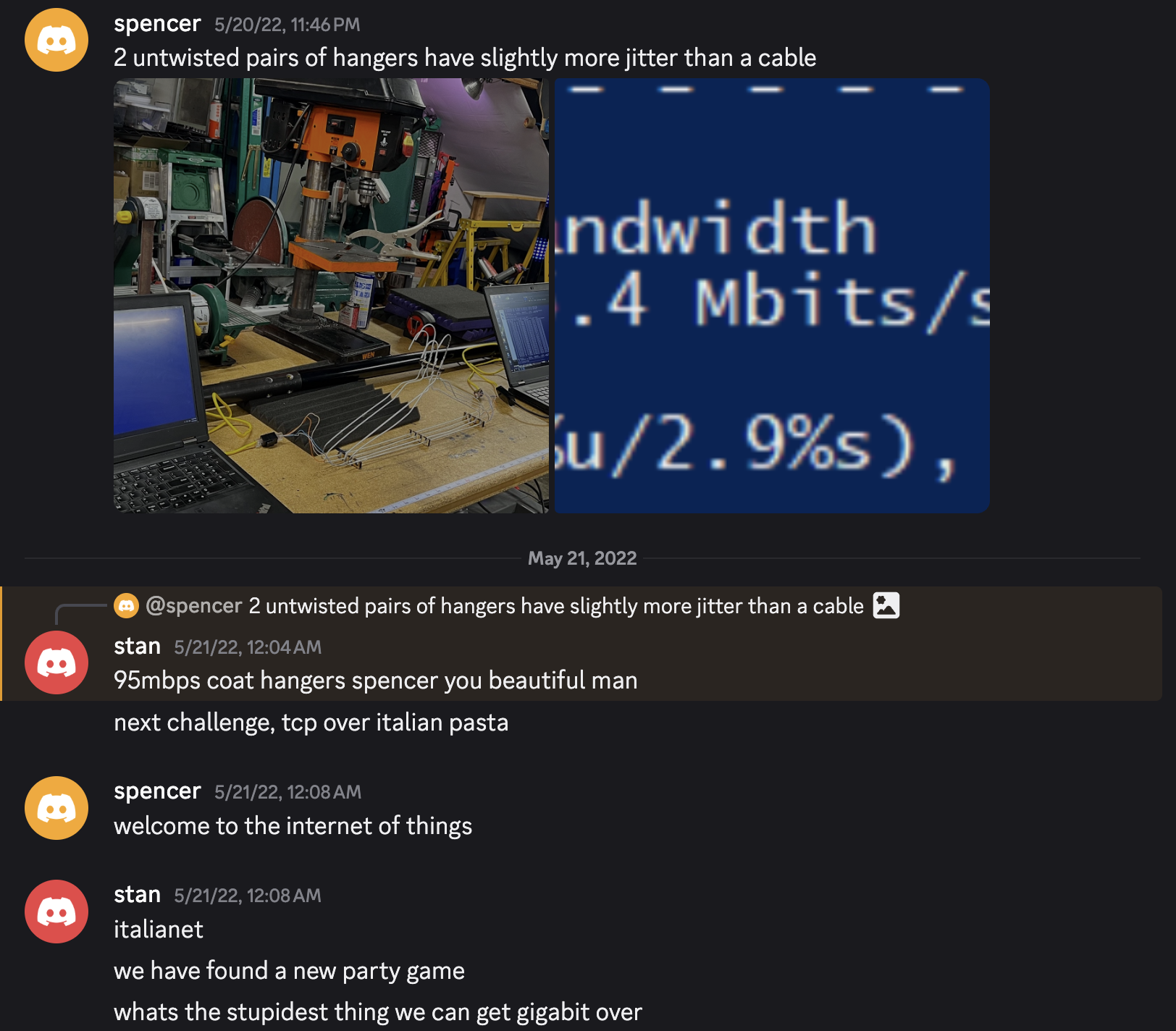
100BASE-TX was designed with enormous margin for terrible installations, and it shows. Four steel rods bent by a garment factory carry it without dropping a single datagram in 43,680.
Rules we keep
- iperf before and after any wiring change. A 30-second UDP run is free and turns "seems fine" into loss, jitter, and bandwidth numbers. We run both the product's rate and unlimited, but only the rate-matched runs qualify the wiring: an unlimited run measures the two endpoints at least as much as the cable between them.
- Bench through nothing. Take 1's 54% loss on a perfect cable was the network, not the wire. Direct link, static IPs, or the data is noise.
- Check negotiation before blaming the medium. A "slow" cable may simply be a 2-pair cable; the 5 Mbit/s we "lost" was the PHY dropping to 100BASE-TX exactly as designed.
- UDP for link qualification, read the right column. TCP hides loss with retransmission; loss and jitter are the numbers that matter for a real-time frame stream. And on a UDP client summary the transfer and bandwidth columns are what the sender offered, not what arrived, which is how a throughput number that means nothing gets quoted as a result.
- Keep the pairs twisted anyway. The coat hangers worked, six feet of untwisted tail worked, and we still wire every production pole with the pairs twisted through the ring. Margin measured is margin you get to keep by not spending it.
Four years later we put a logic analyzer on the other end of this same signal chain and decoded the LED data line bit by bit (Chasing 60 fps down the LED wire), and measured the same hardware's power side until it collapsed (Measuring an LED pole until it browns out). We have still never traced a dropped frame to the slip ring.
All numbers are from the saved iperf transcripts of 2022-05-20 (19 thirty-second runs across two test rounds) plus one coat-hanger run preserved, appropriately, as a screenshot in a group chat.