
Part of Building the 3D Club Scene
Lighting presets that survive recalibration
We hand-balanced eleven brightness channels in our virtual club, auto-generated eight themed "looks" on top of them, and watched most of the looks come out unusably dark. The fix was to stop storing values and start storing intent (ratios and offsets against a frozen baseline) plus a luminance test harness so "darker than the others" is a number. Applies to the factory looks, not the ones you save. Includes one self-inflicted clamp bug and a camera preset that was secretly standing inside the crowd.
Why
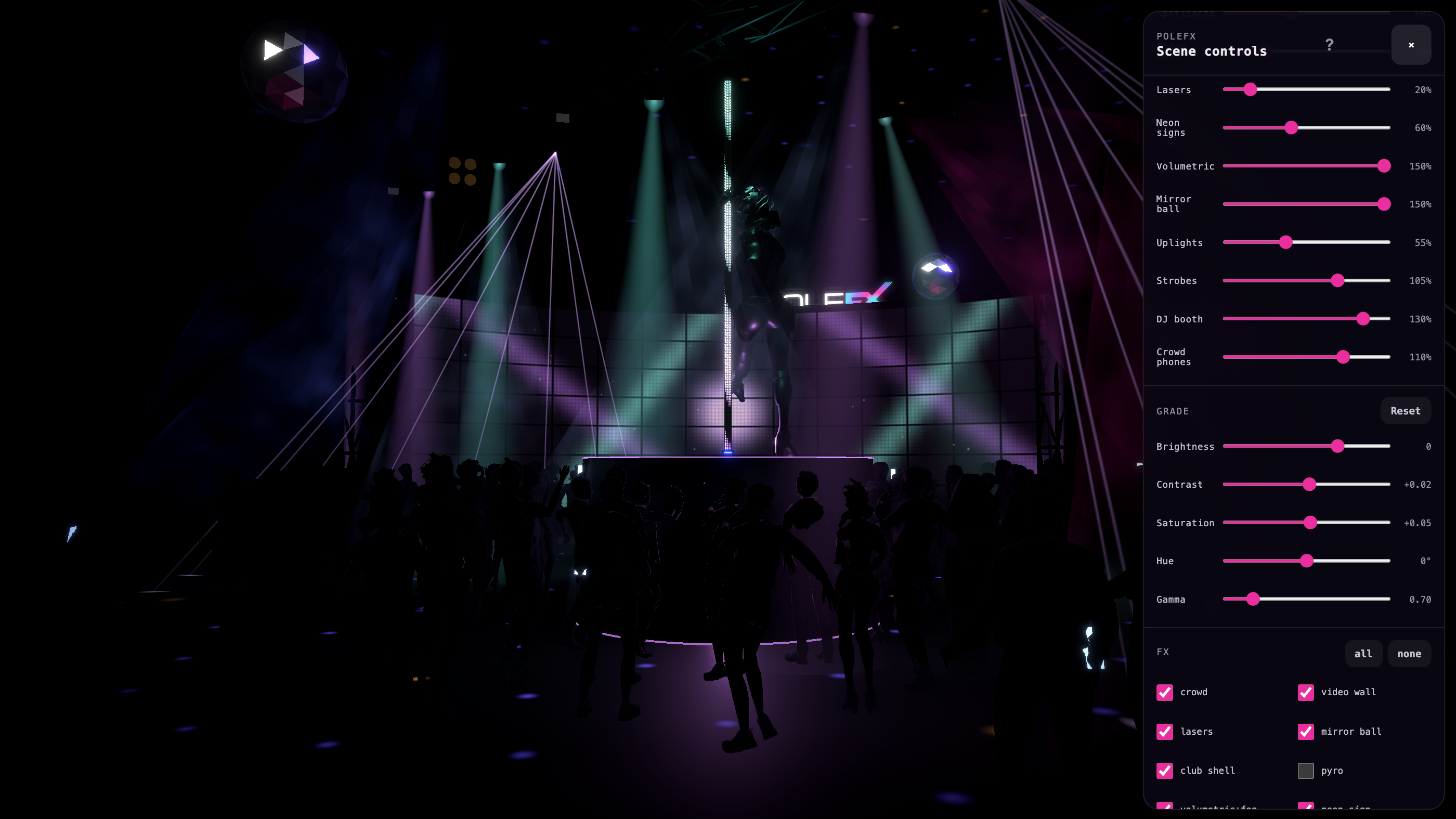
Our 3D club scene has a Levels panel: eleven sliders, one per element — the LED pole, the spotlights, the video wall, the lasers, the neon signs, the volumetric shafts, the mirror ball, the uplights, the strobes, the DJ booth, the crowd's phones. We spent a session dialing them in so the pole reads first and everything else stays present without fighting it. Then there's a Grade panel (brightness, contrast, saturation, hue, gamma) applied to the final composited image.
On top of both sits a looks system: a look is the whole console — palette, pole tint, moving-head cue, spatial sequence, FX set, and a snapshot of Levels and Grade. We shipped nine factory looks. "Slow Blues" pulls the lasers nearly off and lets the mirror ball carry the room; "Ultraviolet" is a blacklight purple; "Golden Hour" is warm and open.
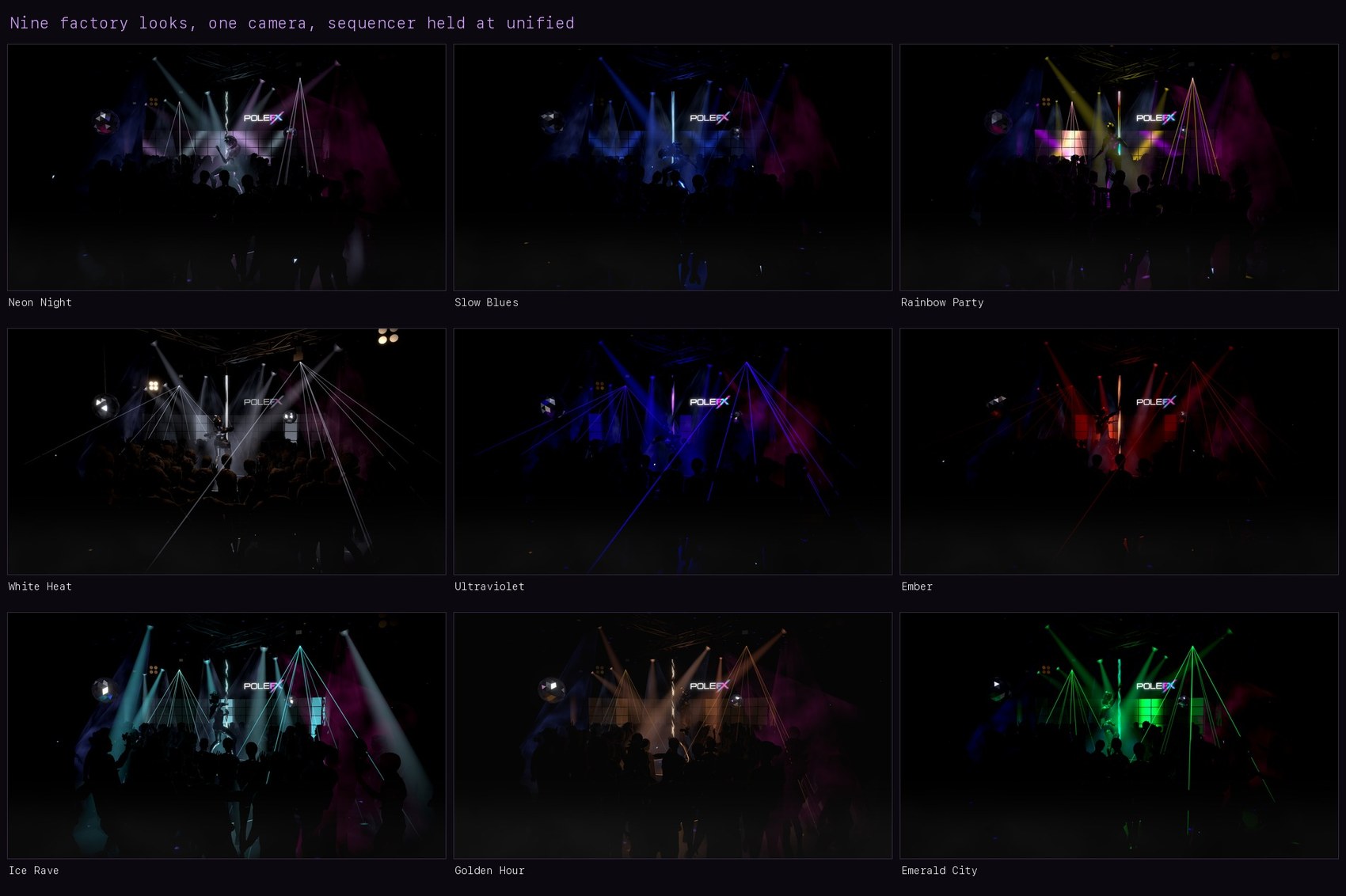
All nine looks from the same camera with the spatial sequencer held at unified. This is a visual comparison, not the luminance harness described below, which used a different camera and frame average.
Clicking through them after the calibration pass was grim. Slow Blues wasn't moody, it was off. Ultraviolet measured 22% of the baseline look's screen luminance. Golden Hour went the other way — 178% of baseline, a searchlight.
What was actually wrong
Four separate things stacked, which is why eyeballing it kept misleading us.
The snapshots were absolute. Each factory look stored literal slider values, authored in code against the defaults that existed that day. The calibration pass moved the baseline; the looks kept applying their stale numbers on top of a room that no longer matched them. This is the same failure as a design system where component themes hard-code hex values instead of referencing tokens: the day you touch the base palette, every theme is wrong by a different amount.
Gamma stacked with brightness. Our gamma control is pow(rgb, 1/gamma),
so gamma below 1 darkens. The moody looks carried gamma 0.55–0.66 and
negative brightness, each authored as if it were the only thing dimming the
room.
The sequencer multiplied on top. Looks carry a spatial sequence — a bright window sweeping the room, stage and perimeter trading, a slow breath. Sequence depth 0.9 means off-window zones sit at 10% most of the time. On a look that was already dark, that read as dead, not choreographed.
The pole tint was eating the hero. A tinted look multiplies the pole's
LED output (and every fixture that follows its hues) by a color. The multiply
happens in linear space, which is where the size of the problem hides: three.js
color management converts #9d4dff to linear before anything sees it, and the
Rec. 709 weights (0.2126 R, 0.7152 G, 0.0722 B) put that violet's relative
luminance at 0.20, not the 0.42 you get from the sRGB triplet. Green is where
luminance lives, and a violet has almost none. We were treating a tint as a hue
statement while applying it as a brightness cut of about 80%. Nobody authored
"pole at a fifth", but that's what shipped.
Storing intent instead of values
The factory look literals didn't change shape; how they're read did. We froze
the defaults the looks were authored against as constants — AUTHORED_LEVELS
and AUTHORED_GRADE — and resolve every factory look at apply time:
- a level becomes a ratio: Slow Blues' lasers were authored at 0.08 against a 0.2 default, so the look means "lasers at 40% of wherever your baseline has them";
- a grade channel becomes an offset: gamma 0.62 against a 0.7 default means "0.08 darker than your baseline", clamped to the control's range.
The resolution anchor is the current calibrated baseline, including any "use as defaults" snapshot the user has baked. Recalibrate the room and every factory look re-derives itself. The default look's numbers equal the authored-day defaults, so it resolves to exactly your baseline — reset stays honest for free.
A ratio is not really intent, it's the cheapest available proxy for it. It preserves a look's relative balance across a baseline move and says nothing about whether the result still reads the way the look was meant to read. Both paths are clamped, levels to 0..2 and each grade channel to its own range, so a wild baseline can only flatten a look, not blow it up.
User-saved looks stay absolute. They were dialed against the real room, and "what I saved is what I get" is the correct contract there. Which means the property in this post's title is a factory-preset guarantee: your own saved looks don't re-derive when you recalibrate, on purpose.
Tints got the same treatment at the other end of the pipe: before the tint color multiplies anything, it's scaled toward a constant linear luminance (target 0.72, boost capped at 2.2× so a near-black tint can't turn electric, and an already-bright tint is left alone). For most of the shipped tints that lands exactly on 0.72. The two saturated ones hit the cap instead and come up short: Ultraviolet's violet gets to 0.43 and Slow Blues' to 0.51. So a tint now mostly changes what color the pole is rather than how bright it is. The two deepest ones still dim the hero, they just pass 2.2× the light they used to.
Edits that stick to the look
The original sin behind all of this was that tweaking a slider while a look was active edited the room, not the look — switch away and back and your adjustment was gone, which is exactly how the stale snapshots got authored in the first place. Now any change to look-owned state writes through to the active look: debounced 250 ms, stored as per-section diffs against the pristine resolution, flushed synchronously if you switch looks inside the debounce window so the edit lands on the look you made it on. Edited looks show a dot on their chip and offer a one-click revert. The Reset buttons on Levels and Grade changed meaning too: they now return to the active look's own values, not to the global defaults.
Making "darker than the others" a number
We stopped arguing with screenshots and wrote a harness: headless Chrome
(--headless=new, which keeps ANGLE on Metal; the old SwiftShader path
renders this scene at 1.5 fps), drive the look store directly through a
console probe, hold a fixed camera, average the mean luma of four frames per
look.
Four frames turned out to be the weakest part of it. They're 0.55 s apart, and a beat at 114 bpm is 0.53 s, so the sampler is very nearly stroboscopic: it catches four frames at almost the same point in the beat rather than averaging across one. And the whole burst spans under two seconds, where the looks carrying a 2- or 4-bar sequence cycle over four to eight. What the number really is, then, is a narrow slice of each look, made comparable by the fixed camera and the same settle-then-sample recipe every time. That's enough to rank looks against each other. It is not a time-average of what a look looks like.
Two traps surfaced immediately. Our first fixed camera was the "Wide" preset, which it turns out stands at y=1.6 inside the crowd, about half a crowd member's height off the floor. We spent a round measuring the backs of a hundred-odd heads, and every look scored within noise of every other. Moving to the booth telephoto made the spread real. And the first resolver clamped resolved levels to the slider maximum of 1.5, which silently dimmed looks that legitimately author past it (the volumetric shafts run at 1.7 in several). The slider's range is a UI decision, not a data limit.
With the harness honest, the numbers moved from a 0.22×–1.78× spread around the baseline look to 0.32×–1.2×. That's a ranking, not a verdict: nothing in it says what ratio counts as too dark, only which looks sit furthest from the baseline and by how much. The ones still out at the edges are the ones that ought to be. Ultraviolet is the darkest look we ship. It's a blacklight. That's the job.
What we'd tell you
If you ship presets of any kind — lighting cues, EQ curves, color themes, camera profiles — assume your baseline will move after the presets are authored, because it will. Store the relationship, not the result. And put a number on the aesthetic property you care about before you tune it; our "too dark" was four unrelated multipliers deep, and no amount of staring at the screen was going to decompose it.